How to request deletion of an app account
Since the app does not acquire indivisual information, it is not possible to confirm from the web whether the deletion request is from the app user. Therefore, any request to delete an app account must be made within the app. If the app has already been uninstalled, install the app again on the same device and create a new user with the account name you want to delete. You cannot confirm your app account from another device. Also, even if it is the same device, if the device has been reset or the device user is changed, the app account may not be confirmed. Please note that if we are unable to confirm your app account, we may not be able to comply with your deletion request.
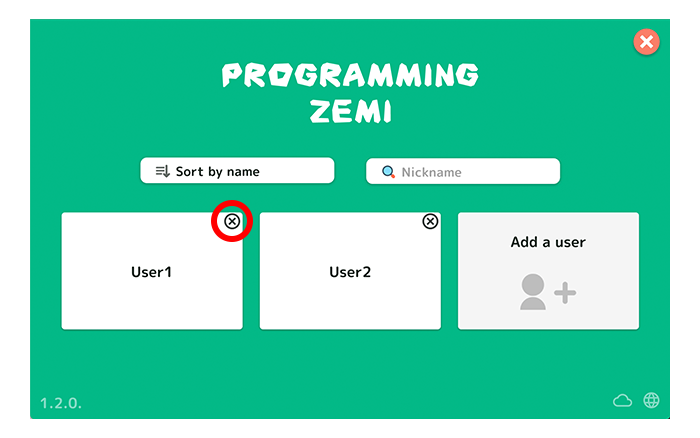
1. Selecting user screen
Tap "x" button of the user which you want to delete.
2. Pop up the user deletion screen
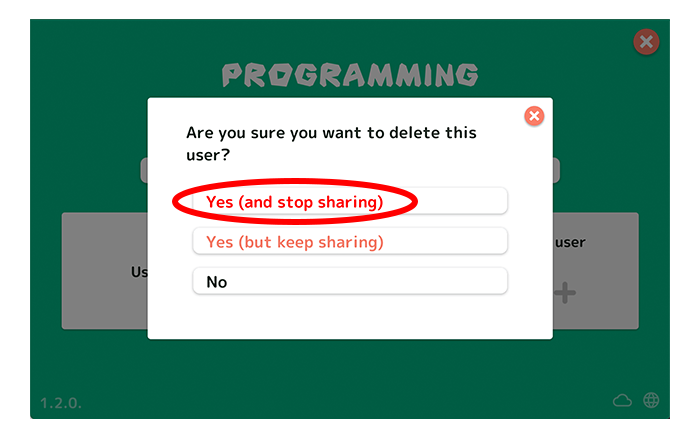
Tap "Yes (and stop sharing)" button.